Detect / Activity Log
A WordPress activity log that answers who did what
When something changes on your site, you want to know who did it and when. Stack Guard's WordPress activity log records sign-ins, failed attempts, lockouts, user changes and setting changes in one searchable place.
Why it matters
Why activity log matters
Sign-ins, setting changes, lockouts and more in one searchable log, kept for as long as your plan allows.
Security events in one place
Sign-ins, failed sign-ins, lockouts, blocks, two-factor changes, password resets, user and role changes, and Stack Guard settings changes.
Search and filter
On Pro, filter by time range and event type, search by user or address, and export to CSV.
Plugin and theme changes
On Pro, every plugin activation, deactivation and theme switch is logged too.
By plan
What each plan includes for activity log
Free
$0- Core events, kept for 7 days
- View in the admin
Pro adds
From $95/yr- Kept for 90 days, with the full event catalogue
- Plugin and theme change logging
- Search, time range and event type filters, and CSV export
Docs
Set it up in minutes
The same plain-language help that ships inside the plugin.
Why you need a WordPress activity log
WordPress does not keep a record of who signed in, who failed to, or who changed a setting. When something goes wrong, the first question is what happened and who did it, and without a log nobody can answer.
A log also shows attacks as they happen, so you can ban an address or tighten a setting, and it gives teams and agencies accountability: you can show a client what changed and when.
What the Stack Guard WordPress activity log records
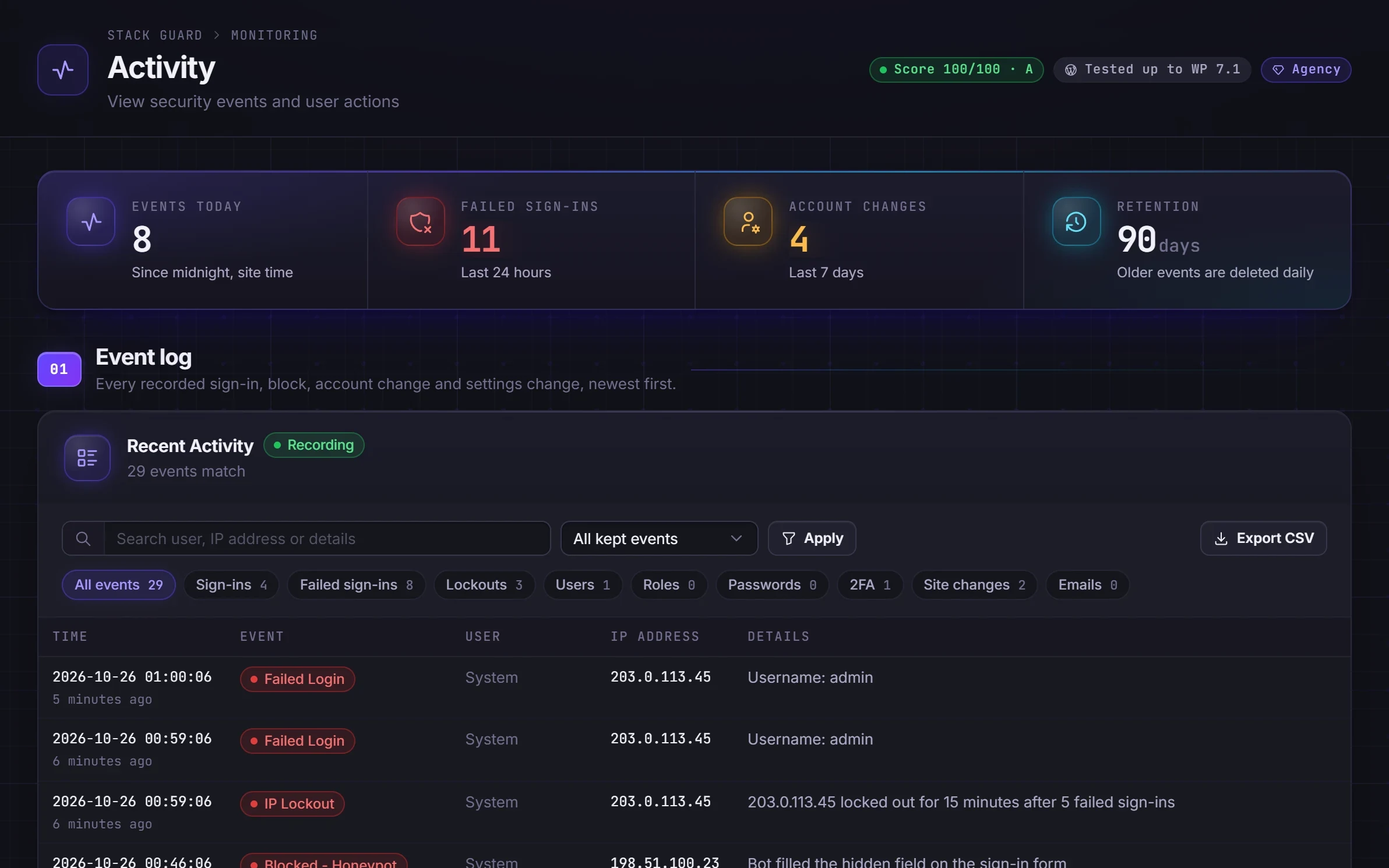
Each event is a line with the time, what happened, the user, the internet address and details. You choose which groups to record, and leaving them all on is the best default.
- Sign-ins, and failed and blocked sign-ins.
- Lockouts and bans.
- User changes, role changes and password resets.
- Two-factor changes.
- Stack Guard settings changes.
- Emails Stack Guard sends, recorded as sent or failed.
- Plugin and theme changes: plugins activated or deactivated and themes switched (Pro).
Search, filter and export
On Free the log keeps core events for 7 days and you read it in the admin. Pro keeps events for 90 days with the full event catalogue, and you can choose a shorter period on the Settings tab. Pro also adds search, time range and event type filters, and CSV export of the latest 5,000 rows, handy for a client report or an investigation.
The Login activity chart on the Monitoring tab draws successful and failed sign-ins over the last 14 days from the same log. Some security events, such as malware scans, are recorded even when logging is off, so protections always leave a trace.
Keep the log useful and private
To set it up, open the Activity tab, switch on Activity Logging under Logging settings, choose the events to track and how long to keep them, then read the log in the Event log section. The log stays in your own WordPress database.
The log stores internet addresses, which count as personal data in many countries. Keep events no longer than you need and mention the log in your privacy policy. You can show email recipients as the domain only, and the error text of a failed email always has addresses removed. Everyone who can open the Activity tab can read the log, so use Stack Guard's access levels to limit who that is.
Questions
WordPress activity log: questions
Does WordPress have a built-in activity log?
No. WordPress does not record who signed in or changed settings. A plugin like Stack Guard adds an activity log that keeps those records in your own database.
How long is the activity log kept?
7 days on Free and 90 days on Pro, with the full event catalogue. You can choose a shorter period on the Settings tab.
Can I export the activity log?
Yes, on Pro. Filter to what you need and export it as CSV for a client report or an investigation.
Is the WordPress activity log free in Stack Guard?
Yes. Free records core events for 7 days and you can view them in the admin. Pro adds 90 day retention, the full event catalogue, plugin and theme change logging, filters, search and CSV export.
Does the activity log track every change on my site?
No. It records security events: sign-ins, failed sign-ins, lockouts and bans, user and role changes, password resets, two-factor changes, Stack Guard settings and emails it sends. It is not an audit log of posts and pages.
Where is the activity log stored?
In your own WordPress database. Nothing is sent to an outside service, and old events are removed automatically when they pass the retention period.
Put Stack Guard's activity log to work today.
Install Stack Guard Free in a minute, or go straight to Pro.