Protect / Firewall
A WordPress firewall plugin that decides before WordPress does
Stack Guard is a WordPress firewall plugin that checks every request against your bans, allow list and rules before WordPress does real work for it, so bad traffic is turned away early.
Why it matters
Why firewall matters
Ban addresses and ranges, keep a trusted allow list, read the real visitor address behind Cloudflare or a proxy, and write rules for the traffic you never want.
Ban an address, a range or a tool
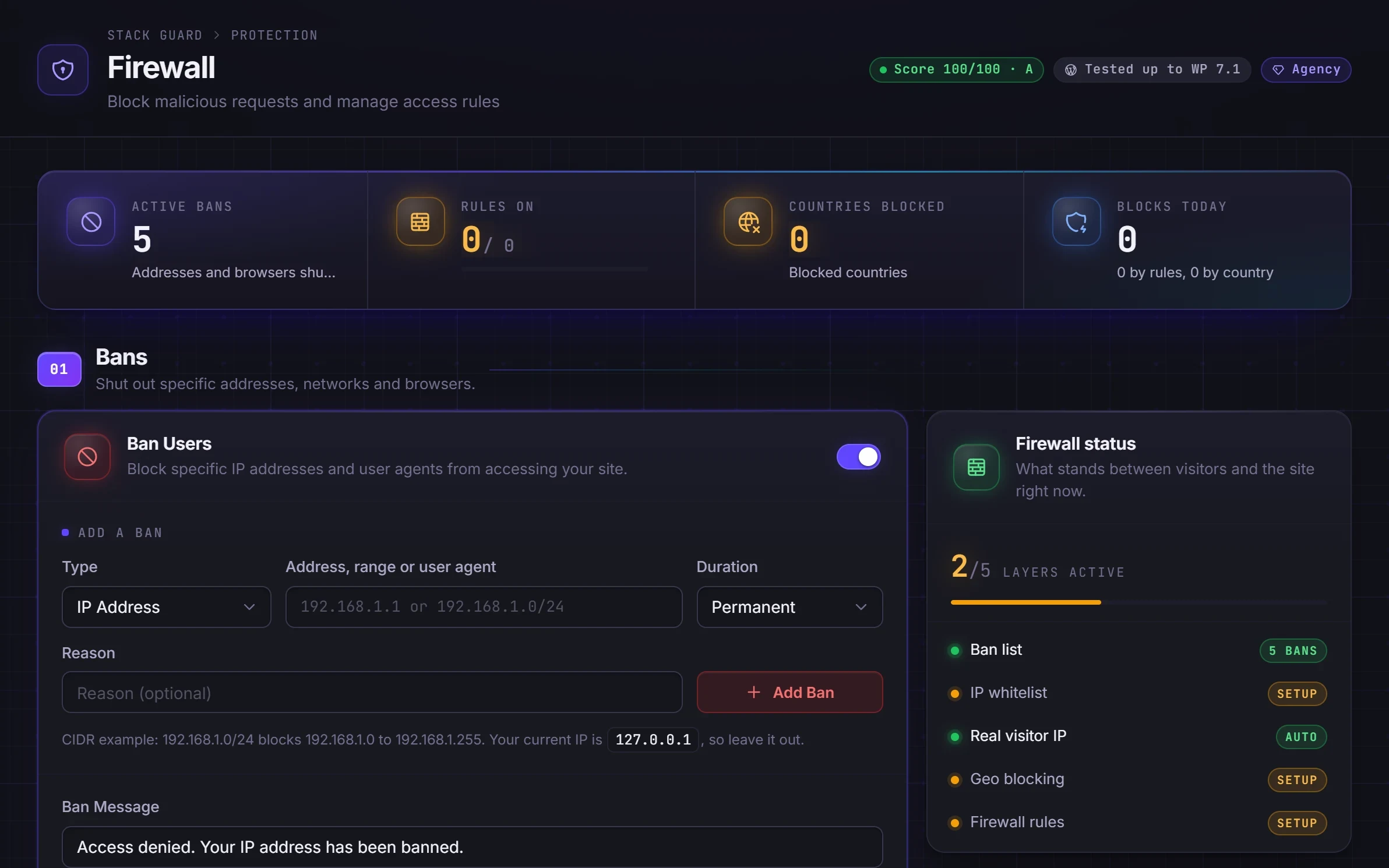
Ban single IPs and whole ranges on every plan. Pro adds user agent bans for attack tools and scanners.
Rules for the traffic you never want
Pro's custom rules match the path, query string, method, user agent, referrer, visitor address, any header or form field, with presets for .git, wp-config.php, bad robots and SQL injection. Each rule shows how often it matched.
Country blocking and automatic bans
Block or allow whole countries with a local lookup database, and let 404 detection ban visitors probing for weak spots.
By plan
What each plan includes for firewall
Free
$0- Manual IP and range bans
- IP allow list
- Trusted proxy and Cloudflare support for the real visitor address
Pro adds
From $95/yr- Custom firewall rules with hit counts
- Country blocking as a block list or allow list, with a country lookup tool
- User agent bans
- Automatic bans for visitors probing for weak spots (404 detection)
Docs
Set it up in minutes
The same plain-language help that ships inside the plugin.
Bans
Blocks a specific internet address, a whole range of addresses, or a kind of software from your entire site, for a set time or for good.
ReadIP allow list
A list of trusted internet addresses, such as your office, that Stack Guard's blocking features never stop.
ReadReal visitor IP (trusted proxy)
Tells Stack Guard how to find a visitor's real internet address when your site sits behind Cloudflare, a load balancer or another proxy.
ReadCountry blocking
Blocks visitors from the countries you choose, or allows only the countries you choose, using a country database stored on your own server.
ReadCustom firewall rules
Your own if-this-then-that rules for incoming requests: block, allow or just log requests that match a page address, a browser name, a visitor address and more.
ReadWhat a WordPress firewall plugin does, and what it does not
A WordPress firewall plugin works inside your site. It sees things a network firewall cannot, such as which requests are sign-in attempts, which ask for backup files and which carry a suspicious query string. It decides what to do with each one before the rest of your site responds.
It is not a replacement for a firewall at your host or at Cloudflare, which filter traffic before it reaches your server. The two work well together: the edge removes the bulk, and Stack Guard handles the WordPress-specific cases and reads the real visitor address behind Cloudflare.
How the Stack Guard firewall decides
Each request passes three checks in order: bans first, then country blocking, then your custom rules. Addresses on the allow list skip all of them, along with brute force lockouts. A banned visitor sees a short Access Denied page on every page.
Administrators are not blocked inside the admin area, but bans, country blocking and rules do apply to them on the front of the site, so do not ban your own address.
- IP and range bans on every plan: one address, or a range written like 203.0.113.0/24, for 1 hour to 90 days or permanently, with a reason you will understand later.
- User agent bans (Pro): block a scraping tool or scanner by the name it gives itself. Lazy robots stop, determined ones change their name.
- Custom rules (Pro): conditions on the address, path, query string, method, user agent, referrer, visitor address, host name, any header or any form field, joined by ALL or ANY, with an action of Block, Allow or Log Only. Presets cover wp-config.php, .htaccess, .git, bad robots, SQL injection attempts and requests with no user agent.
- Country blocking (Pro): a block list or an allow list, with a response of 403, 404 or a redirect, and a lookup tool.
- 404 detection (Pro): bans addresses that request too many missing pages, the typical sign of a vulnerability scanner.
Real visitor IP behind Cloudflare or a proxy
Lockouts, bans, country blocking and the activity log all depend on the right visitor address. If a proxy hides it, you might ban the proxy and lock out every visitor at once, or let an attacker fake any address they like.
The Real visitor IP setting is in every plan. Auto, the recommended mode, recognises Cloudflare and private networks by itself. You can also choose a direct connection, Cloudflare only, or a custom proxy with the header and addresses you name. Headers from untrusted sources are ignored so they cannot be faked. A read-out shows the address Stack Guard sees for you, so you can compare it with a what-is-my-IP site.
Set up your firewall safely
Start by adding your own address to the allow list with Add My IP. Then turn on one protection at a time and open the site in a private window after each change. Risky settings carry a Test After Changing marker.
Try every new custom rule as Log Only first and check the activity log for a day. When it only catches what you meant, switch it to Block. Each rule card shows how many times it matched today and over 30 days.
Treat country blocking as a filter that cuts noise, not a wall: country data is never perfect and VPNs let people appear anywhere. Allow-list mode is strict, so anyone travelling abroad is blocked unless their address is allowed. For 404 detection, the starting values are 20 misses in 5 minutes, and a site with many broken links can catch real visitors, so fix the links or raise the threshold. If you ever lock yourself out, the SMG_SAFE_MODE switch in wp-config.php turns off bans, country blocking and rules until you remove it.
Questions
WordPress firewall plugin: questions
Do I need a WordPress firewall plugin if I use Cloudflare?
Cloudflare filters traffic at the edge; Stack Guard works inside WordPress and knows things Cloudflare does not, such as which requests are sign-ins or probes for backup files. They work well together, and Stack Guard reads the real visitor address behind Cloudflare.
Is the Stack Guard firewall free?
IP and range bans, the allow list and trusted proxy support are free. Custom rules, country blocking, user agent bans and automatic 404 bans are Pro.
Does country blocking send visitor data anywhere?
No. Stack Guard downloads a free country database and looks addresses up on your own server.
Can a firewall rule block me from my own site?
It can, so risky settings carry a Test After Changing marker, and the SMG_SAFE_MODE switch in wp-config.php turns off bans, country blocking and rules until you remove it.
Can I ban a whole range of IP addresses?
Yes, on every plan. Ban a single address or a range such as 203.0.113.0/24, for anything from an hour to 90 days or permanently, and add a reason so you remember why.
Does the firewall stop requests before they reach the rest of WordPress?
Bans, country blocking and custom rules are checked early in each request, so a blocked visitor gets a short refusal instead of your page. Regular expressions in rules are limited and checked so a bad pattern cannot hang the server.
More in Protect
Shut the doors attackers try first.
Put Stack Guard's firewall to work today.
Install Stack Guard Free in a minute, or go straight to Pro.