Protect / Security Headers
WordPress security headers, CSP and HSTS without the guesswork
WordPress security headers tell every visitor's browser how to protect them on your site. Stack Guard sends the essential ones in a click and has a Content Security Policy builder for when you are ready to go further.
Why it matters
Why security headers matters
Clickjacking, referrer and permission headers in a click, plus a Content Security Policy builder with presets and a violation log when you are ready to go further.
Clickjacking and leaks covered
X-Frame-Options, Referrer-Policy, Permissions-Policy and the cross-domain policy, sent on every front-end page from Free.
A CSP you can actually build
Pro's Content Security Policy builder has presets, a nonce, report-only mode and a violation log, so you can tighten it without breaking the site.
HTTPS, always
HSTS on Pro tells browsers to use HTTPS every time, with max age, subdomains and preload options.
By plan
What each plan includes for security headers
Free
$0- X-Frame-Options, Referrer-Policy, Permissions-Policy and cross-domain policy
Pro adds
From $95/yr- Content Security Policy builder with presets, nonce, report-only mode and a violation log
- HSTS with max age, subdomains and preload
- Cross-Origin-Opener-Policy and Cross-Origin-Resource-Policy
Docs
Set it up in minutes
The same plain-language help that ships inside the plugin.
Core security headers
Sends a set of standard instructions with every page, telling browsers not to show your site inside other sites, not to guess file types, and how much to reveal when visitors follow a link away.
ReadContent Security Policy
Gives browsers a list of the places your pages may load scripts, styles, images and fonts from. Anything else, such as a script slipped in by an attacker, is refused.
ReadHSTS (always use HTTPS)
Tells browsers to always use the secure https:// version of your site, even if someone types or clicks an http:// link.
ReadCross-origin headers
Keeps your pages and files separate from other websites: other sites cannot reach into a window your site opened, or load your files where you did not intend.
ReadWhat WordPress security headers are
A header is a short line of text your server sends before each page. Visitors never see it, but their browser follows it. Security headers use that channel to say things like do not show this site inside another site's frame, do not guess file types, or only load scripts from these places.
Security scanners, insurers and audits often check for them first, and they close whole families of browser attacks such as clickjacking. WordPress does not send most of them by default.
The WordPress security headers Stack Guard sends
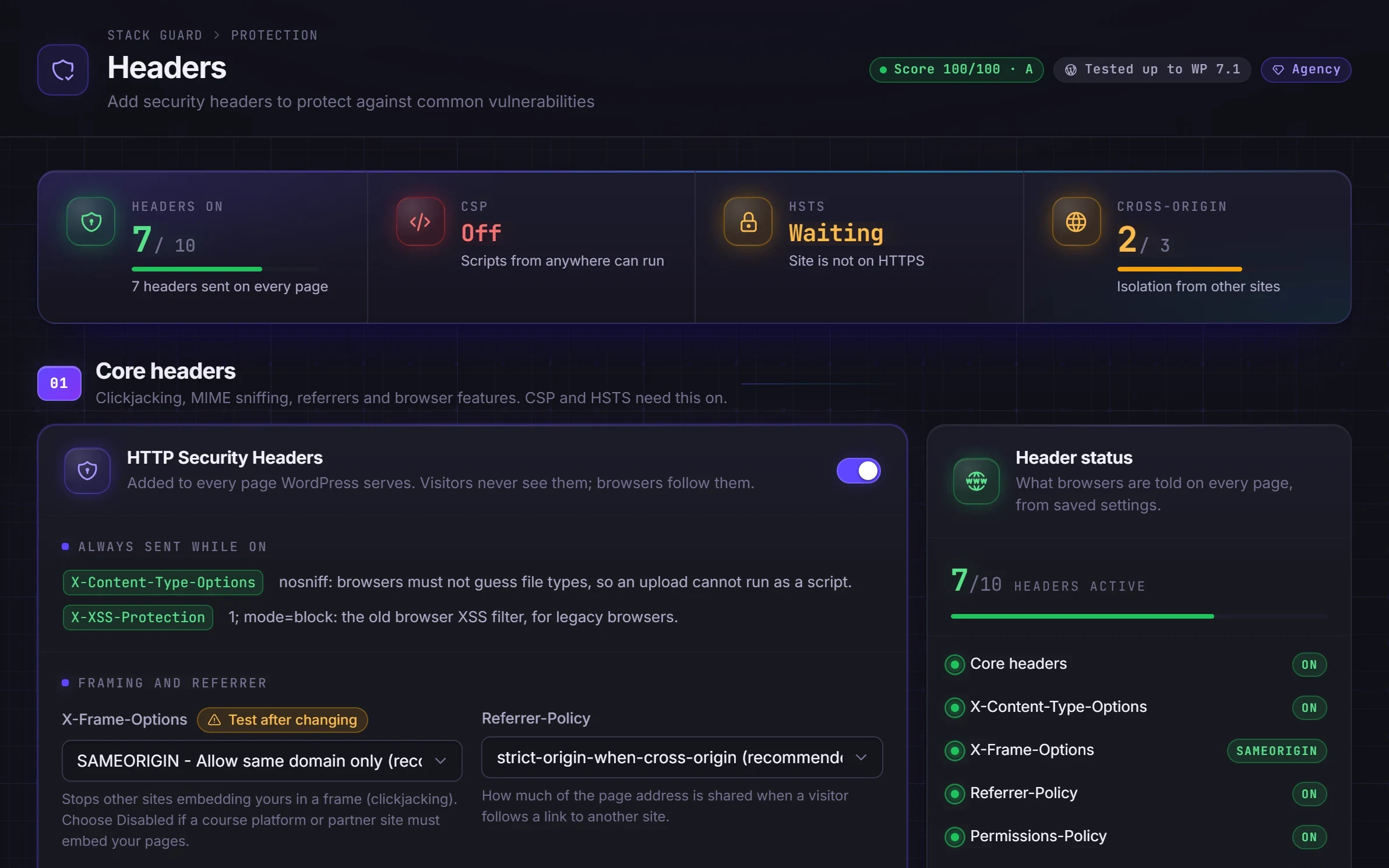
Switch on HTTP Security Headers in Core headers on the Headers tab. That one switch controls the rest: Content Security Policy, HSTS and the cross-origin headers are only sent while it is on. Headers are sent on front-end pages. The admin area, sign-in page, AJAX and REST responses do not pass through it.
- X-Frame-Options (SAMEORIGIN by default): stops other sites framing your pages, the trick behind clickjacking. Free.
- X-Content-Type-Options: tells the browser to trust the file type your server states, so an uploaded file cannot pretend to be a script. Free.
- Referrer-Policy (strict-origin-when-cross-origin by default): controls how much of your page address is passed on when a visitor clicks away. Free.
- Permissions-Policy: tells the browser your pages never use the camera, microphone, location, payment, USB or motion sensors. Free, optional.
- Cross-domain policy files blocked. Free.
- Content Security Policy builder, HSTS, Cross-Origin-Opener-Policy and Cross-Origin-Resource-Policy. Pro.
Build a Content Security Policy without breaking your site
A Content Security Policy is an allow list for your pages: for each kind of content, you list where it may come from. A good one stops the browser running a script an attacker injected, which is how sign-in cookies get stolen. A policy that is too strict can also break maps, chat widgets or payment forms, so the safe path is report-only first.
- Pick a Quick preset close to your site, such as WordPress Compatible or WooCommerce. A preset replaces the directives below it.
- Set the mode to Report-only and switch on Collect violation reports. Visitors see no change.
- Browse your site for a few days, including forms, checkout and embedded video, then read the violation log and add the sources you trust.
- When the log stays quiet, switch the mode to Enforce.
- Use nonces for scripts adds a one-time code to scripts WordPress loads properly. Scripts printed straight into a page by a theme or plugin without it will be blocked.
HSTS, cross-origin headers and checking your result
HSTS makes a browser remember to use https only, which removes the first insecure request on public Wi-Fi. It is hard to undo, because browsers keep the rule until the max age runs out, so start with a short max age such as a day or a week and raise it to a year once nothing breaks. Only switch on Include subdomains and Preload when every subdomain has a working certificate. Preload submission is done by you at hstspreload.org. HSTS is only sent on requests that are already https.
Cross-Origin-Opener-Policy and Cross-Origin-Resource-Policy keep your pages and files separate from other sites. Payment and social sign-in popups can break with the stricter same-origin opener setting, so test checkout and sign-in after changing them.
After you save, use the scan link in the Response headers panel to check the result from outside. Your host, a CDN or another plugin may send some of the same headers, and two copies can confuse browsers, so switch duplicates off in one place. Stack Guard's compatibility check reads what your host or CDN already sends.
Questions
WordPress security headers: questions
What are WordPress security headers?
They are instructions your site sends with every page, such as do not show this site inside another site's frame, or only load scripts from these places. Browsers follow them to protect your visitors.
Can a Content Security Policy break my site?
Yes, if it blocks a script or style your site needs. That is why Stack Guard recommends starting in report-only mode with a violation log, so you can see what would be blocked before you enforce it.
My host or Cloudflare already sends headers. Will they clash?
Stack Guard's compatibility check reads the headers your host or CDN already sends and tells you about any overlap.
Are WordPress security headers free in Stack Guard?
The core headers are: X-Frame-Options, X-Content-Type-Options, Referrer-Policy, Permissions-Policy and blocking cross-domain policy files. The Content Security Policy builder, HSTS and the cross-origin opener and resource policies are Pro.
How do I check my WordPress security headers?
The Response headers panel on the Headers tab shows what Stack Guard sends and links to an outside scan. Run it after saving, because your host or CDN can change what finally reaches the browser.
What is HSTS and is it risky?
HSTS tells browsers to always use https for your site. It is safe when your whole site works over https, but browsers keep the rule until the max age ends even if you switch it off, so start short and raise it slowly. Preload is harder still to reverse.
More in Protect
Shut the doors attackers try first.
Put Stack Guard's security headers to work today.
Install Stack Guard Free in a minute, or go straight to Pro.